
Introduction
My two-year-old daughter attends a kindergarten in Argentina. There is a rule that all communication between staff and parents happens via email only. They send everything there: important and unimportant news, schedule updates, holiday greetings, payment reminders and so on. So it’s a mix of noise and things that I wouldn’t want to miss.
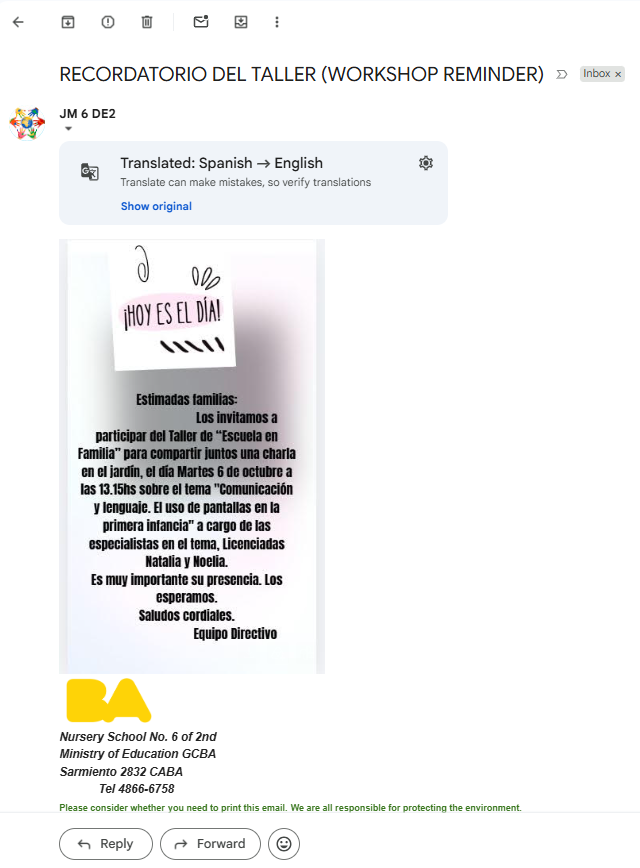
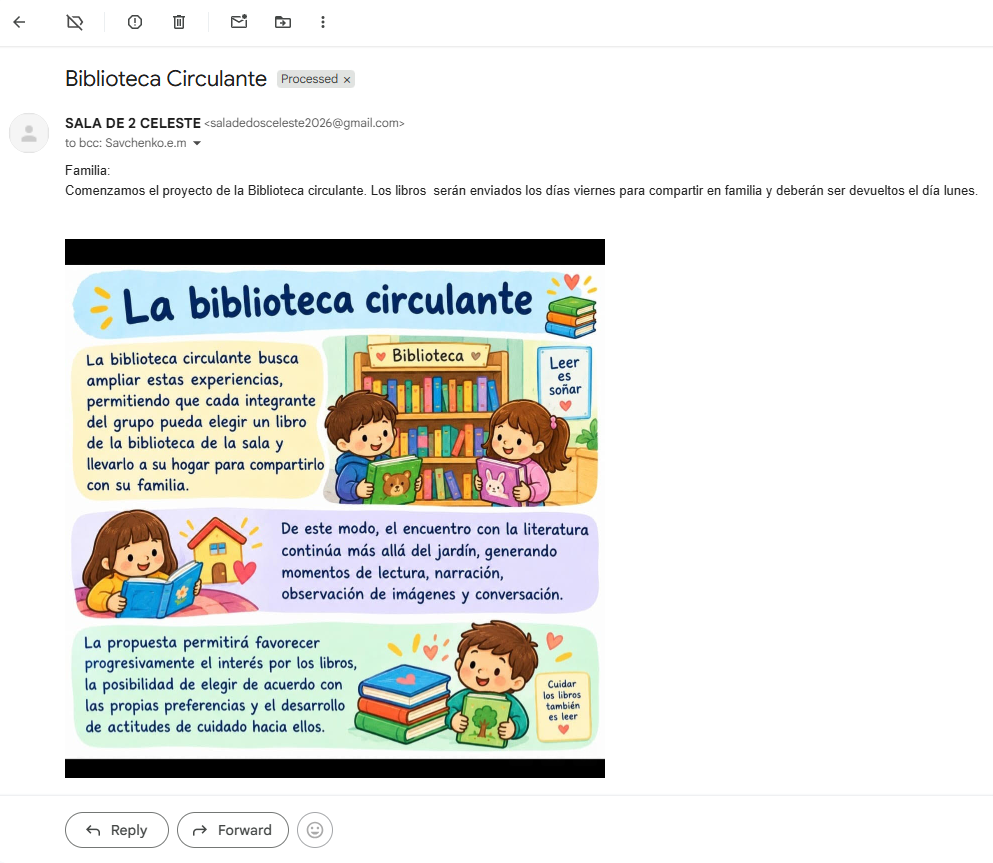
I don’t speak Spanish, so I have to translate every email. And here is the problem. They tend to send emails with little text (or even without it) but add images with text on them. The built-in Gmail translator does not help with this.
A typical example.
So, I decided to build an app that processes these emails for me, classifies them and sends a short summary in Russian to a Telegram group where my wife and I can comfortably read them.
The code is on GitHub: DeV1L/kindergarten-email-checker.
The general idea
- No access to my personal mailbox: Something that reads my whole inbox with an LLM is not what I want to run.
- Simple architecture: One container, no overhead. It should fit in my Always Free k3s cluster from the previous post.
- One email → one Telegram message: A short summary in Russian, with urgency and category labels.
- Process images and PDFs: Most of the content lives there, so the model has to see them.
- Minimize costs: Don’t send too much to the LLM, and use a cheap one.
Implementation
A high-level view:
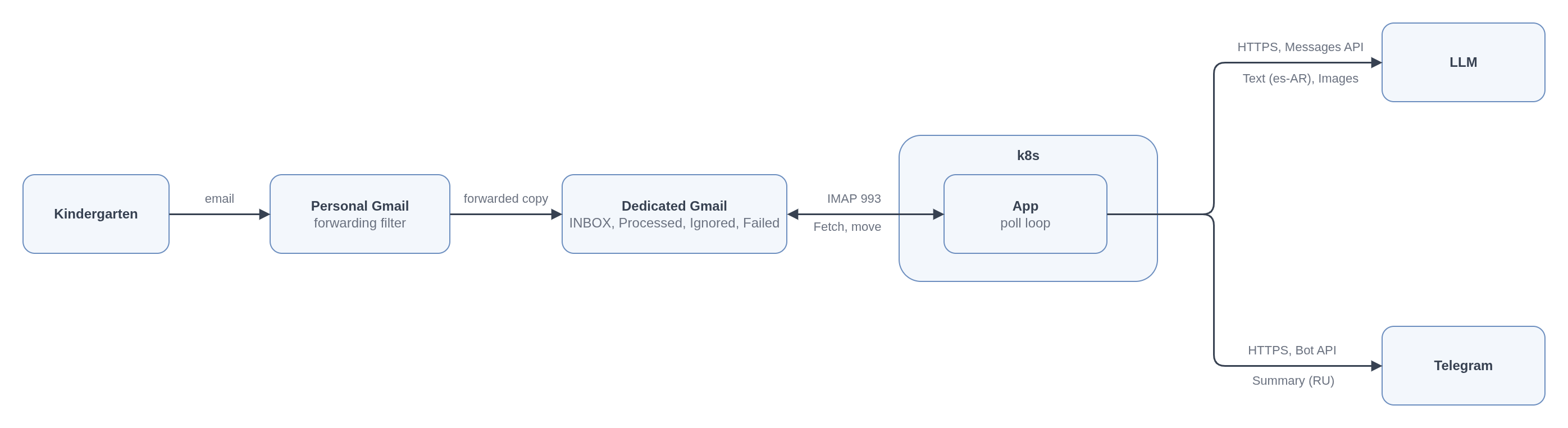
- A forwarding filter in the personal Gmail forwards the emails from the kindergarten addresses to a dedicated mailbox.
- Every 10 minutes the app connects to the dedicated mailbox over IMAP with an app password, processes the new emails one by one and logs out.
- For each email, the LLM writes a summary, the app posts it to the Telegram group and moves the email to the
Processedlabel.
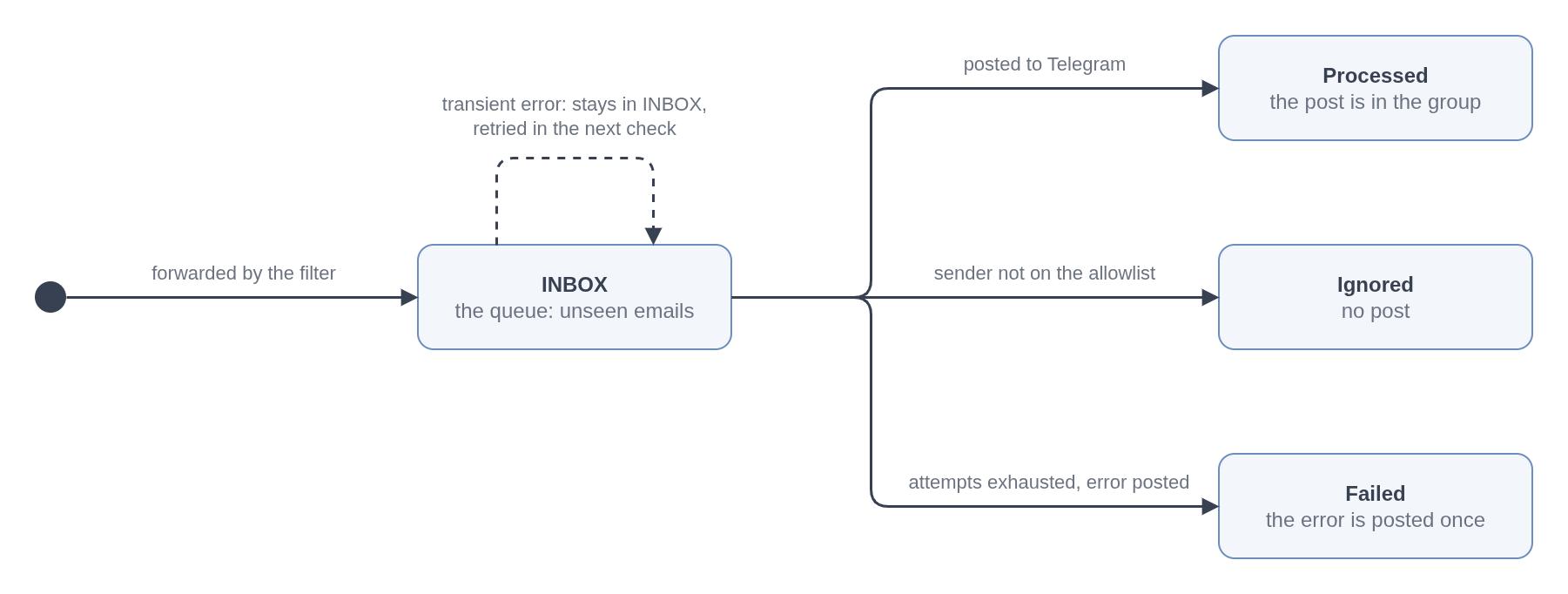
Gmail labels are the only state: INBOX is the queue; Processed, Ignored and Failed record the outcome. No database is needed.
Processing flow
Every 10 minutes the app checks the mailbox. It opens a new IMAP connection, creates the state labels if they are missing, and asks for the unseen emails in INBOX. It fetches them one by one, without marking them as seen, so one email with its attachments is in memory at a time. Each email goes through six stages.
1. Allowlist
The app reads the From header and compares it with the allowlist. Gmail forwarding keeps this header untouched, so the forwarded copy still shows the kindergarten address. If the sender is on the list, the email moves on to the next stage. If not, the app moves it to Ignored.
2. Extraction
The model gets text and images. So the app converts every part of the email to text or to an image:
- The body. The app takes the
text/plainpart of the body. When the email has only an HTML part, it converts the HTML to text. Long bodies are cut at 40,000 characters. - PDFs. If the pages have a text layer, more than 200 characters per page on average, the app extracts the text. If not, it is probably a scan, and the app renders each page to a PNG image.
- Photos. JPEG, PNG and GIF attachments go to the model encoded in base64. Images under 20 KB (logos, signatures, etc.) are skipped.
Attachments over 10 MB and files of other types do not go to the model.
3. Prompt
The app assembles the request in the Anthropic Messages API format:
- The system prompt.
- One user message with a text block: the metadata (sender, subject, dates, etc.), the body text, the text of each PDF.
- The images, in the same user message, each as a base64 image block.
4. Model call
The app sends the request to the DeepSeek Anthropic-compatible API. It has no JSON mode and no structured output, but it supports tools, and a tool has a JSON schema.
So, instead of a text answer, the model calls one tool, report_summary, with the summary as the arguments of that call. The input schema of the tool is generated from a Pydantic model. The app validates the tool input against that model.
If the input is invalid or the model did not call the tool, the app sends the error back as a tool result and asks again. If the second answer is malformed too, the app posts the original text.
5. Post
The app builds one Telegram message from the fields and sends it with the Bot API:
- A header line:
urgency,category,deadlineandevent date. - The title in bold.
- The summary.
- “What to do”, when the model found an action.
- The attachment names, when there are any.
- A footer: the subject, the sender and the sent date of the email.
A Telegram message holds at most 4096 characters. A summary never gets close. The fallback post with the original text can, so the app cuts the text to fit.
6. Move
The app moves the email to Processed with the IMAP MOVE command. From this moment the email counts as done.
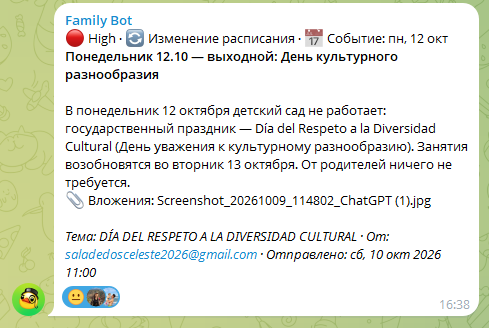
Post examples
🔴 High · 🔄 Изменение расписания · 📅 Событие: пн, 12 окт
Понедельник 12.10 — выходной: День культурного разнообразия

В понедельник 12 октября детский сад не работает: государственный праздник —
Día del Respeto a la Diversidad Cultural (День уважения к культурному разнообразию).
Занятия возобновятся во вторник 13 октября. От родителей ничего не требуется.
📎 Вложения: Screenshot_20261009_114802_ChatGPT (1).jpg

Тема: DÍA DEL RESPETO A LA DIVERSIDAD CULTURAL · От: saladedosceleste2026@gmail.com
Отправлено: сб, 10 окт 2026 11:00
The first line shows what kind of email it was: urgency, category, deadline, event date. Then the title and the summary itself: what, when, what to do or bring. When there is something to do, it gets its own line. The attachments are listed by name but not uploaded.
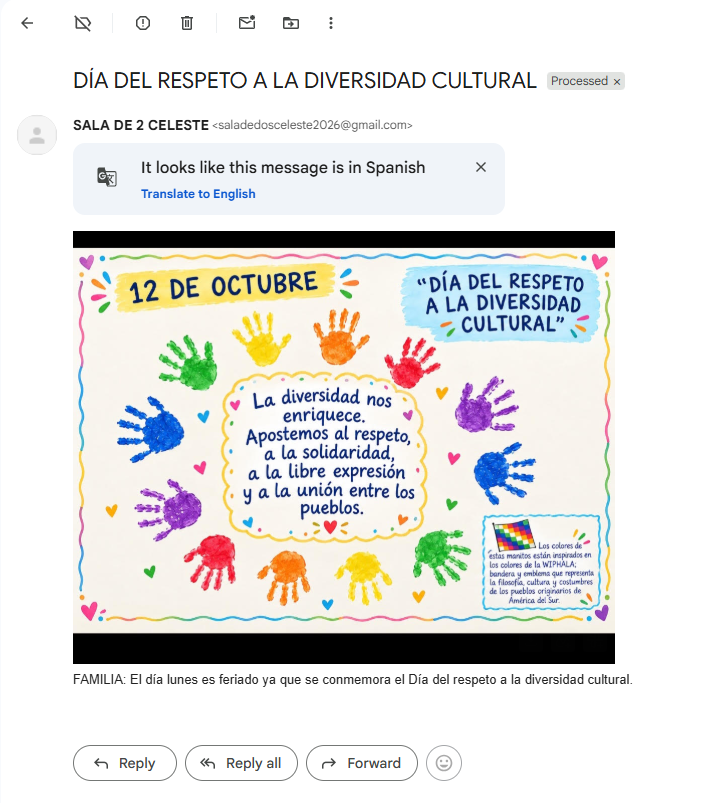
A couple of real examples:
 →
→
 →
→

Gotchas
Gmail labels as the database
There is no database and the app has nothing on disk. An email is in exactly one label, and the label says what happened to it.
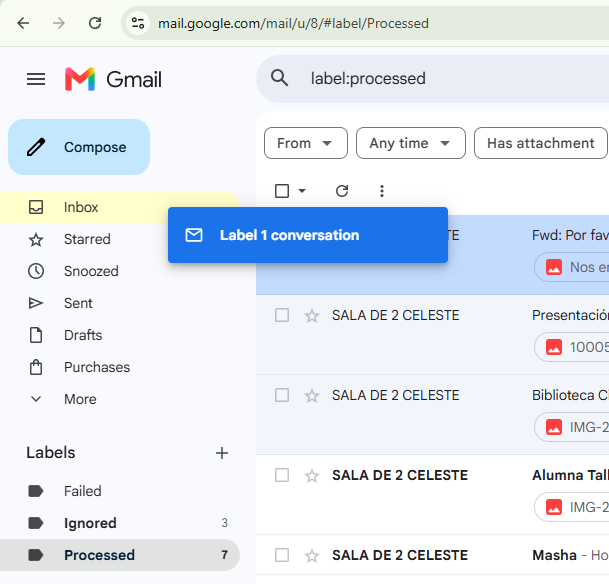
As a bonus, the Gmail web UI is the admin interface. The Failed label shows what went wrong. An email moved back to INBOX gets processed again at the next check.
DeepSeek quirks
DeepSeek serves the Anthropic Messages API format at https://api.deepseek.com/anthropic. The whole call is one request:
response = client.messages.create(
    model=settings.llm_model,
    max_tokens=settings.llm_max_tokens,
    system=SYSTEM_PROMPT.replace("{TOOL_NAME}", tool_name),
    messages=messages,
    tools=[tool_definition(settings)],
    # DeepSeek rejects a forced tool_choice with thinking on. prompt.md asks for the call.
    tool_choice={"type": "auto"},
    thinking={"type": "enabled", "budget_tokens": 8000},  # DeepSeek ignores the budget
    output_config={"effort": settings.llm_effort},
)
DeepSeek looks like a cheap alternative to the Anthropic API, but it is not an exact copy. Two quirks took a while to figure out.
-
Thinking and a forced tool call do not work together. Thinking must be turned on: the emails have dates like “el viernes” that must be resolved from the sent date, and urgency needs a judgement. At the same time the answer must be structured data, so the summary comes back as a call of the
report_summarytool, whose JSON schema is generated from a Pydantic model. The Messages API has a way to force a specific tool:tool_choice={"type": "tool", "name": "report_summary"}. DeepSeek rejects it when thinking is on:HTTP 400: {'error': {'message': 'Thinking mode does not support this tool_choice', 'type': 'invalid_request_error'}}The workaround is
tool_choiceset toauto, plus a system prompt that tells the model to call the tool exactly once. -
Invalid JSON looks like an empty call. Occasionally DeepSeek writes tool arguments that are not valid JSON and doesn’t report an error. It returns the tool call with the input
{}. Pydantic rejects that, and the app sends the error back as atool_resultblock with the full previous response and thinking blocks included. The second attempt has been fine every time so far.WARNING kindergarten_email_checker.summarize: uid=11 attempt 1: {"problem": "invalid report_summary input", "input": {}, "errors": [{"type": "missing", "loc": ["title_ru"], "msg": "Field required"}, {"type": "missing", "loc": ["summary_ru"], "msg": "Field required"}, {"type": "missing", "loc": ["urgency"], "msg": "Field required"}, {"type": "missing", "loc": ["category"], "msg": "Field required"}]}
“null” is not null
The schema has four optional fields: the action, the deadline, the event date and the event time. The model sometimes writes the string "null" instead of a JSON null. As a fix, a validator handles it: the strings "", "null" and "none" count as no value.
Urgency is about time, not about the topic
The first prompt version said: high for anything urgent, cancelled, closed, or about health or safety. The model did exactly that. Every health notice became red, including “if your child has symptoms, keep them at home”. Those were false alarms.
Now the prompt asks one question: how soon must the parent do something?
high: act within two days, or attendance changes within two days.medium: act later, or an event with the child later.low: nothing is required. General rules and conditional instructions, such as “if your child has symptoms, keep them at home”, arelow.
The topic went to a separate field, the category: payment, event, closure, health, and so on. Category says what the email is about, urgency says how soon. So a health notice can be health and low at the same time. The category is only a label in the first line of the post.
PDFs as images
The Anthropic API takes a PDF as a document block, and the model reads it. DeepSeek’s endpoint does not support documents, only images. So the app renders the pages at 110 dpi and sends them as images.
Dates and the timezone
The prompt gives the model the sent date, the weekday and today’s date, all in the Buenos Aires timezone. The emails say “el lunes” or “el viernes”, not a date, and the model can only resolve that from the day the email was sent.
The bot token in the logs
The Anthropic SDK and the app itself use httpx2, and at the INFO level it logs the URL of every request. Telegram URLs contain the bot token. A log formatter replaces the token in every line, tracebacks included. The path reads /bot<token>/.
Real-world usage
The app has been running for three weeks on the free k3s cluster from the previous post.

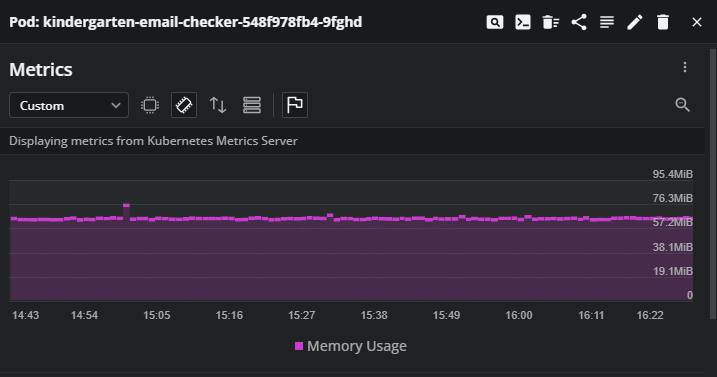
It needs about 60 MiB of memory.

Some numbers:
- Weeks online:
3 - Emails processed:
15 - DeepSeek:
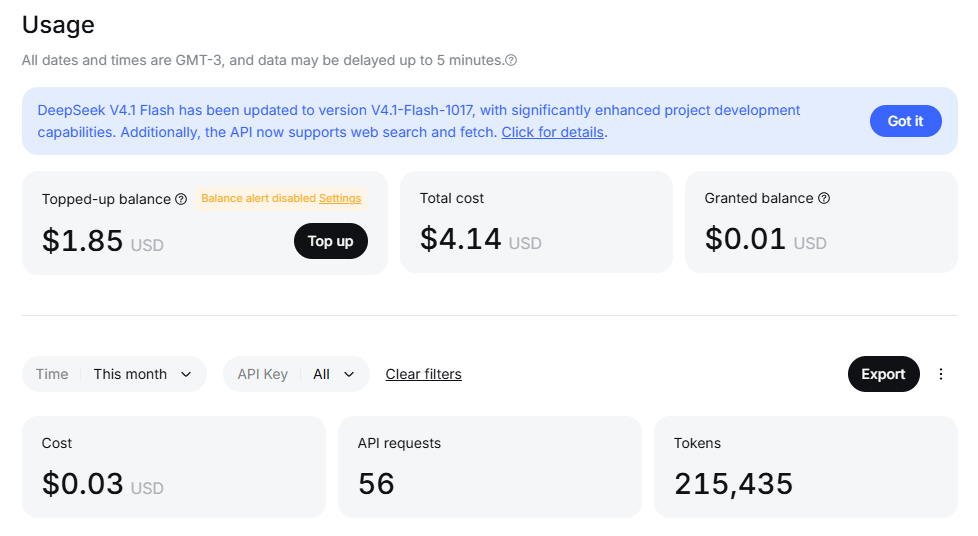
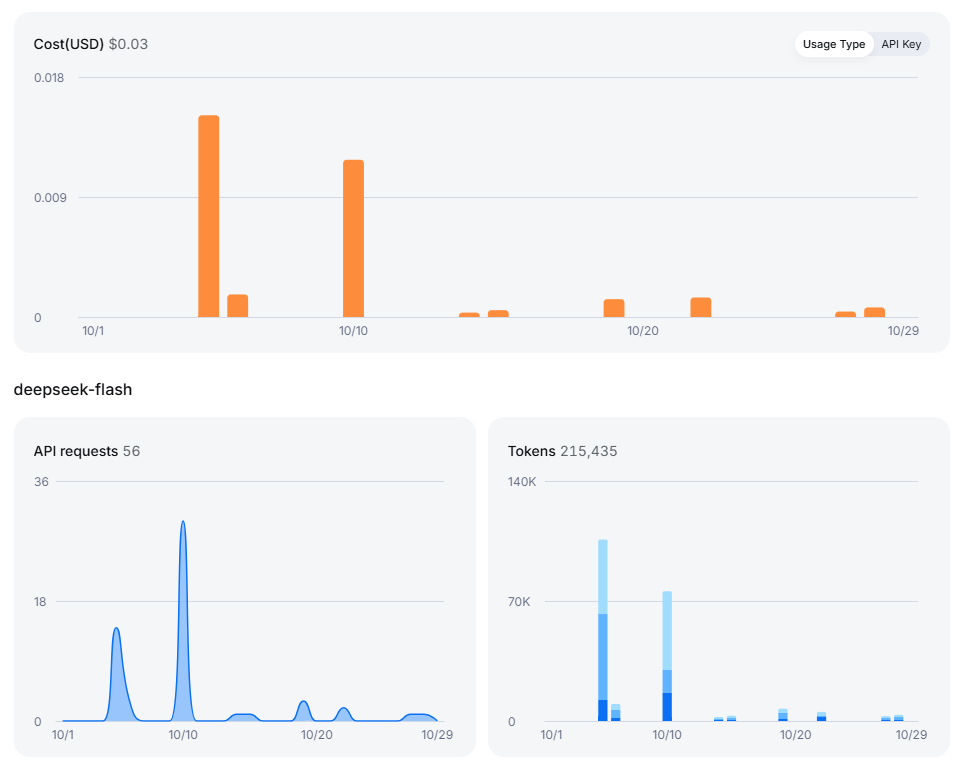
56requests,215ktokens and0.03USD spent.
Next plans
By now, I have about 100 emails from the kindergarten. I’m going to build a golden dataset, run different models against it and measure them: accuracy, cost per email, speed, etc. It will be interesting to compare expensive frontier models with native structured output against cheap Chinese models like DeepSeek.
That will probably be the next post. Stay tuned.