
Introduction
Oracle Cloud has an Always Free tier. The best part of it is two always free super-tiny VM.Standard.E2.1.Micro instances. Each has one CPU (actually, OCPU) and 1 GB of RAM.
But what can you do with two 1 GB machines?
Of course, turn them into a Kubernetes cluster! 😎
I wrote a Pulumi project that spins up a two-node k3s cluster on Oracle Cloud, with all the cloud resources it needs.

Architecture
The repository is a Pulumi program in Python. It creates:
- A virtual cloud network (VCN) with a public subnet, an internet gateway and a security list.
- Two instances with Ubuntu 24.04 Minimal: the server node
k3s-serverand the agent nodek3s-agent-1. k3s installs itself at the first boot. - A network load balancer with the one reserved public IP (only one is available for free). It forwards port 6443 to the server node, and ports 80 and 443 to both nodes.
- An ephemeral public IP on each node, for SSH and outbound traffic.
- An OCI Vault with two secrets: the k3s join token and the kubeconfig.
- Traefik with Let’s Encrypt certificates for Ingress.
Everything is inside the Always Free limits. The bill is zero.
The code is on GitHub: DeV1L/oracle-cloud-k3s.
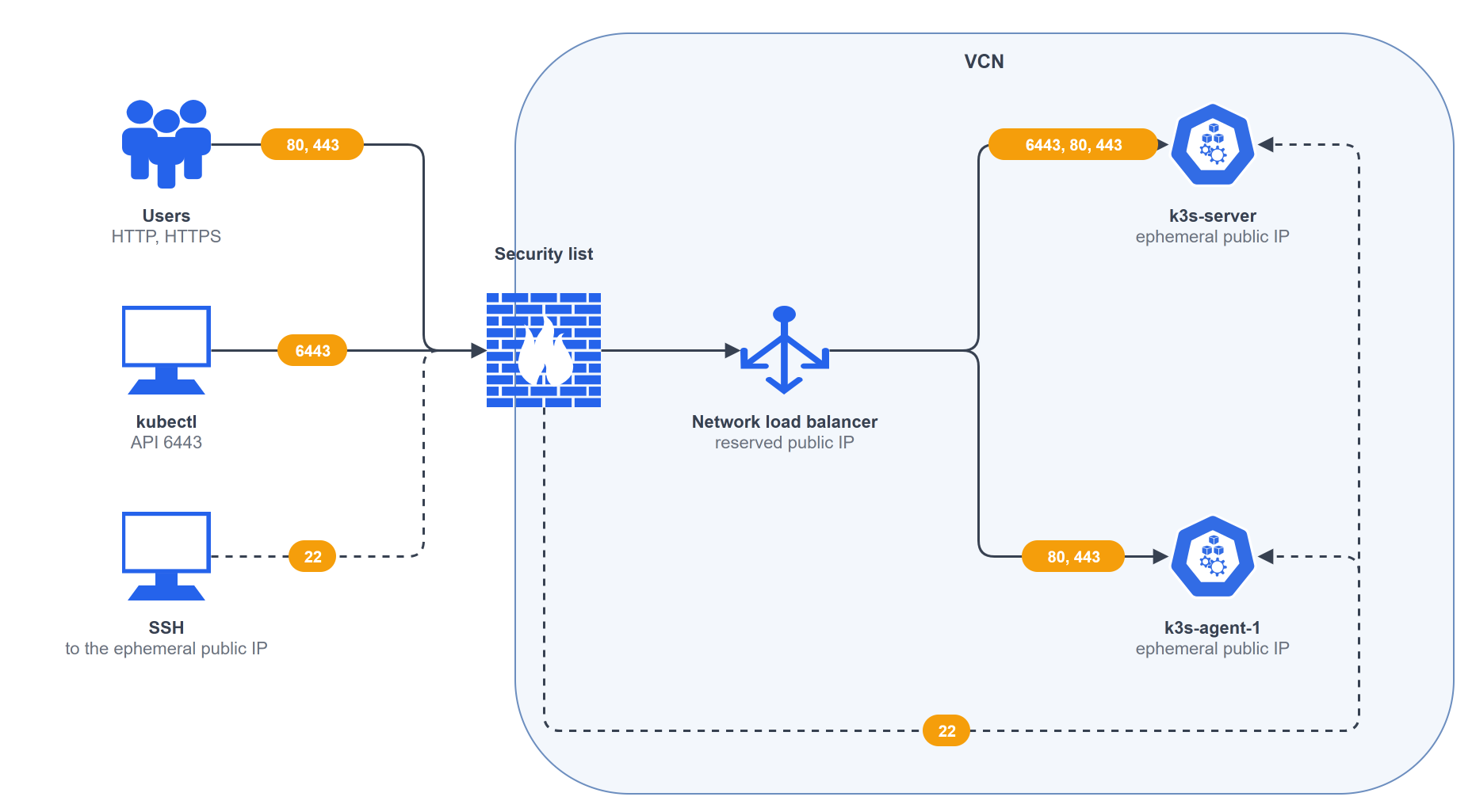
Traffic from the internet reaches the reserved public IP on the load balancer. The load balancer sends HTTP and HTTPS to both nodes, where Traefik takes over. Traffic from kubectl goes to port 6443 and reaches the server node only.
If a node is rebuilt (replaced), the IP and the DNS name stay the same. Each node gets its own ephemeral public IP for outbound traffic and SSH.
The Pulumi program
The program has one stack, default. All account-specific values are set in Pulumi.default.yaml: the region, the availability domain, etc. The other values have defaults.
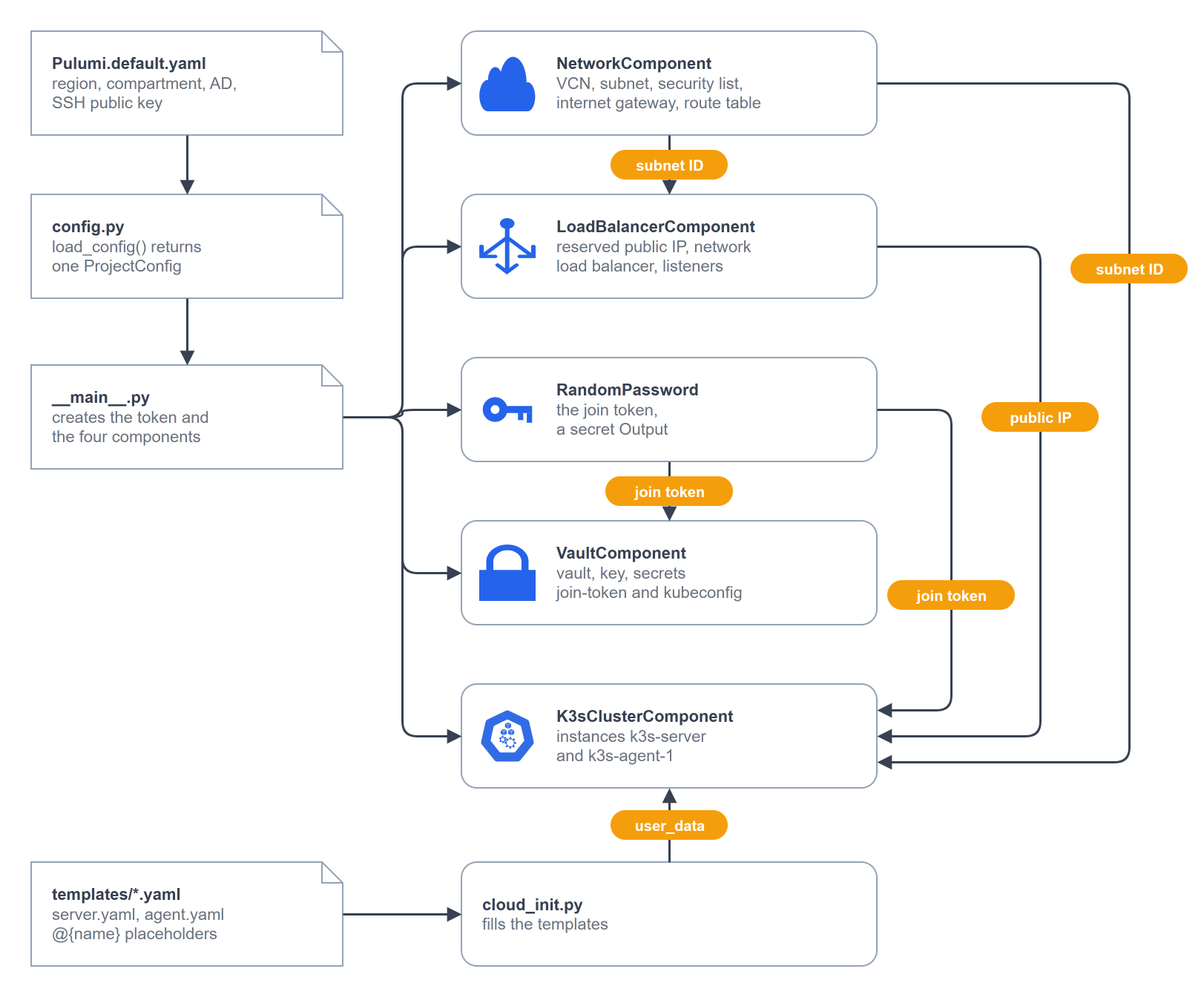
The entry point is __main__.py. It reads the configuration, creates a random join token and then four components:
network = NetworkComponent("network", config)
vault = VaultComponent("vault", config, join_token=join_token.result)
load_balancer = LoadBalancerComponent("lb", config, subnet_id=network.subnet_id)
cluster = K3sClusterComponent("cluster", config, subnet_id=network.subnet_id, join_token=join_token.result, public_ip=load_balancer.ip_address)
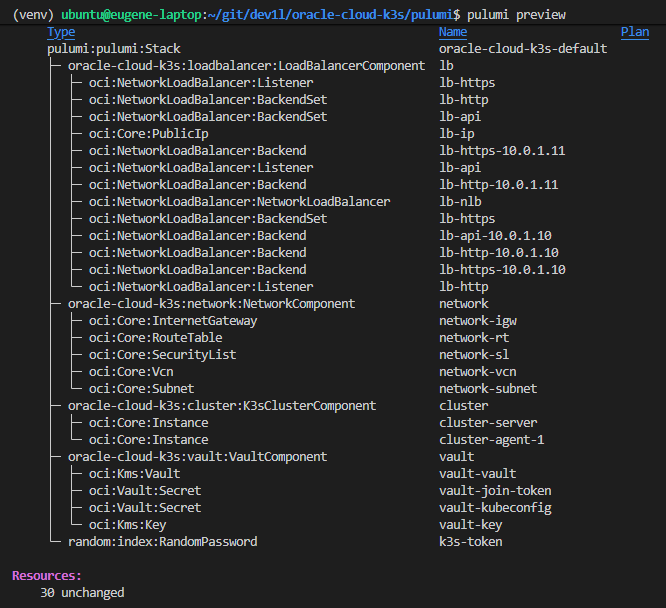
Each component is a pulumi.ComponentResource in its own module. It owns one area of the infrastructure: Network, Vault, Load Balancer, Cluster. The child resources get parent=self, so pulumi preview shows them as a tree under their component. The components connect only through outputs. The network gives the subnet ID, the load balancer gives the reserved IP.
A component example
The load balancer component is a good example. It creates the entry point of the cluster. This is the shortened version:
class LoadBalancerComponent(pulumi.ComponentResource):
    """Reserved public IP, network load balancer, and a listener for each port."""

    def __init__(self, name, config, subnet_id, opts=None):
        super().__init__("oracle-cloud-k3s:loadbalancer:LoadBalancerComponent", name, None, opts)
        self._name = name
        child = pulumi.ResourceOptions(parent=self)

        self.public_ip = oci.core.PublicIp(
            f"{name}-ip",
            compartment_id=config.compartment_ocid,
            lifetime="RESERVED",
            opts=pulumi.ResourceOptions(parent=self, ignore_changes=["privateIpId"]),
        )

        self.nlb = oci.networkloadbalancer.NetworkLoadBalancer(
            f"{name}-nlb",
            compartment_id=config.compartment_ocid,
            subnet_id=subnet_id,
            is_private=False,
            reserved_ips=[oci.networkloadbalancer.NetworkLoadBalancerReservedIpArgs(id=self.public_ip.id)],
            opts=child,
        )

        node_ips = [config.server_private_ip, config.agent_private_ip]
        self._forward("api", config.API_PORT, [config.server_private_ip])
        self._forward("http", 80, node_ips)
        self._forward("https", 443, node_ips)

        self.ip_address = self.public_ip.ip_address
        self.register_outputs({"public_ip": self.ip_address})
        pulumi.export("public_ip", self.ip_address)

    def _forward(self, name, port, backend_ips):
        """Forward TCP `port` to the same port on the backends."""
        child = pulumi.ResourceOptions(parent=self)
        backend_set = oci.networkloadbalancer.BackendSet(
            f"{self._name}-{name}",
            network_load_balancer_id=self.nlb.id,
            name=name,
            policy="FIVE_TUPLE",
            health_checker=oci.networkloadbalancer.BackendSetHealthCheckerArgs(protocol="TCP", port=port),
            opts=child,
        )
        for ip in backend_ips:
            oci.networkloadbalancer.Backend(
                f"{self._name}-{name}-{ip}",
                network_load_balancer_id=self.nlb.id,
                backend_set_name=backend_set.name,
                ip_address=ip,
                port=port,
                opts=child,
            )
        oci.networkloadbalancer.Listener(
            f"{self._name}-{name}",
            network_load_balancer_id=self.nlb.id,
            name=name,
            default_backend_set_name=backend_set.name,
            port=port,
            protocol="TCP",
            opts=child,
        )
The first line of __init__ tells Pulumi that a resource of type oracle-cloud-k3s:loadbalancer:LoadBalancerComponent exists. It is an entry in the state only. The entry is the parent of everything the component creates, so the resources form one group in the resource graph of the program. The group has three effects:
- The state and
pulumi previewshow the resources as a tree under the component; - The resource options of the component (for example
protect) pass down to the children; - Children keep their identity as long as the parent keeps its name.
The component creates two OCI resources and sets their properties:
- The reserved public IP;
- The network load balancer.
The PublicIp object needs one extra option. When the load balancer takes the IP, OCI sets private_ip_id on the IP automatically, so Pulumi does not set this property. Without ignore_changes, the next pulumi up would reset the property and detach the IP from the load balancer.
The method _forward() creates a backend set, one backend per node IP and a listener for one port.
The component ends with register_outputs() and exports the public IP, which the cluster component gets as an input.
Configuration
The stack configuration lives in Pulumi.default.yaml. The function load_config() in config.py reads it once and returns a ProjectConfig object with typed fields. The main program passes this object to every component, so no component reads the stack configuration itself.
Settings come from one of three places:
- Required keys (for example region, compartment, availability domain) in the stack file
Pulumi.default.yaml. - Optional keys (for example DNS name) in the stack file
Pulumi.default.yaml. DEFAULT_*constants (for example k3s version, network ranges, swap size) inconfig.py.
k3s join token
The join token is a shared secret with which the agent node joins the server node. It is declared as a RandomPassword resource. Pulumi generates it on the first pulumi up. The value is stored encrypted in the state and stays the same on every later run.
Inside the program the value is an Output[str] with the secret flag. Pulumi passes it to the Vault secret and into the cloud-init of both nodes. It is shown as [secret] instead of the value in the preview and in the logs.
Cloud-init
The templates server.yaml and agent.yaml have @{name} placeholders. The cluster component fills them inside Output.all(join_token, public_ip).apply(...) and passes the result to OCI as Base64 user_data.
The cloud-init writes the k3s configuration and one bootstrap script, then runs it. The script creates a 2 GB swap file, removes two iptables rules of the Ubuntu image, stops unneeded services and installs the pinned k3s version. On the server node, the script also writes the kubeconfig, and the cloud-init adds the Traefik configuration.
Deployment
There are two ways to deploy the stack:
- Run
pulumi uplocally.
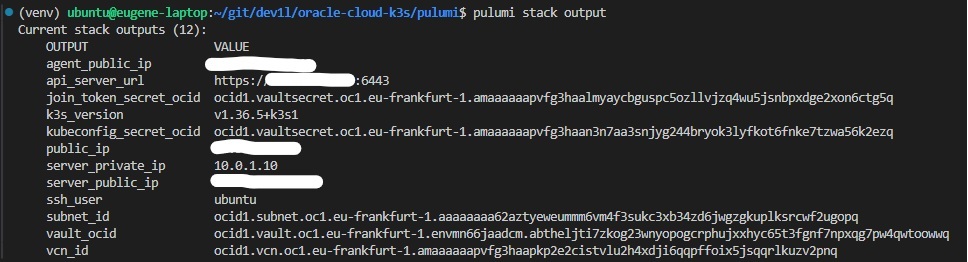
- Start the GitHub Actions workflow in the repository.
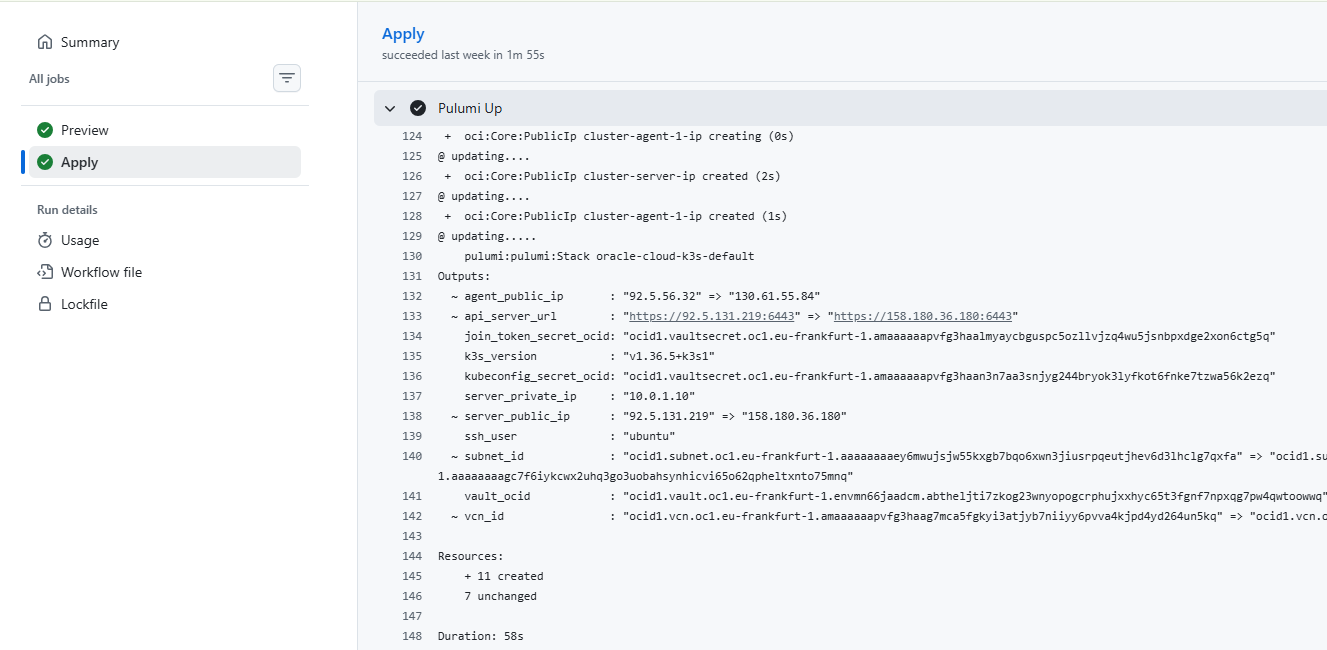
Both use the same state in the OCI Object Storage bucket.
The GitHub Actions workflow has two jobs:
pulumi previewruns on every pull request and every push tomain.pulumi upruns only on a manual start, with theapplyinput set to true.
A concurrency group allows one run at a time.
Pulumi accesses the OCI Object Storage bucket through its S3-compatible API. The workflow gets the Customer Secret Key and the API signing key from repository secrets.
Oracle Cloud Always Free limits
The limits of the Free Tier shaped the design:
- Two micro instances;
- One reserved public IP for the load balancer;
- One vault of type DEFAULT with software-protected keys;
- No NAT gateway, ephemeral public IPs instead.
Gotchas
A few facts about OCI and k3s on 1 GB that are good to know before the first pulumi up:
- Capacity for the micro shape is not guaranteed. The repository has a script that checks the capacity. Run it before any replacement.
- OCI rejects changes to
user_dataand SSH keys on a live instance. So a change to cloud-init means that the nodes must be recreated. - A deleted vault waits 7 to 30 days for its deletion and still counts against the limit of one. A rebuild of the cluster deliberately keeps the vault.
- The OCI Ubuntu image rejects forwarded traffic with iptables rules. It is fixed in the cloud-init scripts.
Real world
The cluster is pretty small, but it does real work. I run a couple of my personal experimental tools and chat bots there. The limit is clear: anything that needs more than a few hundred MB of RAM does not fit here.
The next post will be about one of those tools.
Try it out
- Register an OCI account: https://signup.cloud.oracle.com/
- Clone the repository: https://github.com/DeV1L/oracle-cloud-k3s
- Create the OCI credentials: an API signing key and a Customer Secret Key.
- Put the region, the availability domain and the SSH public key into
Pulumi.default.yaml. - Run
pulumi up, or start the GitHub Actions workflow.
The full guide, with every command, is in docs/SETUP.md.
Keep building!